
• Photo cameras
  • Lenses
  • Tripod
  • Video Cameras
  • Bags
  • Studio
  • Image editing
  • Binoculars
  • Accessories
  • Promotions
  • Canon
  • Sony
  • Nikon
  • Panasonic
  • Fujifilm
  • Sigma
  • DJI
  • Tamron
  • OM SYSTEM
  • Epson
  • All brands
  • Popular Sony Cameras
  • sony-a7v-1.jpg

    Sony A7 V

  • sony-a6700-body_1.jpg

    Sony A6700 body

  • 12311310_1.jpg

    Sony Cybershot DSC-RX100 mark VII

  • Popular Sony Lenses
  • SONY-FE-24-70MM-F2.8-GM-II-1.jpg

    Sony FE 24-70mm F/2.8 GM II

  • SONY-FE-24-105MM-F4.0G-OSS-1.jpg

    Sony FE 24-105mm F4 G OSS E-Mount

  • SONY-FE-50MM-F1.8-1.jpg

    Sony 50mm F1.8 E-Mount Full Frame

  • Popular Nikon Cameras
  • Nikon-Z8_1.jpg

    Nikon Z8 body

  • nikon-z6-iii-1.jpg

    Nikon Z6 III

  • nikon-zf_1.jpg

    Nikon ZF

  • Popular Nikon Lenses
  • Nikon Z 24-70mm F28 S-line Nikkor 1.jpg

    Nikkor Z 24-70mm F2.8 S

  • Nikon-Z-70-200mm-F18-S-line-Nikkor-1.jpg

    Nikon Z 70-200mm F/2.8 S-line Nikkor

  • Nikon-Z-135mm-F1.8-1.jpg

    Nikon Z 135mm F/1.8 S-line Plena

  • Popular Panasonic Cameras
  • panasonic-g9ii-1.jpg

    Panasonic LUMIX DC-G9II

  • panasonic_lumix_S52X-1.jpg

    Panasonic Lumix DC-S5IIX Body

  • panasonic_lumix_s5_m2_body.jpg

    Panasonic Lumix DC-S5II body

  • Popular Panasonic Lenses
  • 12289260_1.jpg

    Panasonic 24-105mm F4.0 L-Mount

  • panasonic-lumixs-50mm-f18_1.jpg

    Panasonic Lumix S 50 mm F/1.8

  • 12217412_1.jpg

    Panasonic Lumix G Vario 100-300mm F4-5.6 II O.I.S.

  • Popular Fujifilm Cameras
  • fujifilm_x-t5_zwart-1.jpg

    Fujifilm X-T5 Body Black

  • Fujifilm-X-E5-zwart-1.jpg

    Fujifilm X-E5 black

  • fujifilm-x100vi-silver-1.jpg

    Fujifilm X100VI silver

  • Popular Fujifilm Lenses
  • Fujifilm_30700_foto1.jpg

    Fujifilm XF 70-300mm F/4.0-5.6 R LM OIS WR

  • 11024042_32426.jpg

    Fujinon XF 16-55mm f/2.8 R LM WR

  • Fujifilm_XF33mm_F14_RWR_foto1.jpg

    Fujifilm XF 33mm F/1.4 R WR

  • Popular Sigma wide angle lenses
  • sigma-24-70-f2.8-dgdnii-art-lens-1.jpg

    SIGMA 24-70mm F2.8 DG DN II Art Sony E-mount

  • Sigma-18-50-E_1.jpg

    Sigma 18-50mm F/2.8 DC DN Contemporary Sony E

  • Popular Sigma macro lenses
  • Sigma_105mm_F2.8_1_2.jpg

    Sigma 105mm F/2.8 DG DN Macro ART Sony FE

  • Popular Sigma telephoto lenses
  • 12201072_1.jpg

    Sigma 150-600mm F/5-6.3 DG OS HSM Contemporary Canon EF

  • Sigma_70_200_2.8_1.jpg

    Sigma 70-200mm F/2.8 DG DN OS Sports Sony FE-mount

  • Popular DJI Drones
  • DJI-Mini-5-Pro-Fly-More-Combo-Smart-Controller-Cleaning-Kit_1.1.jpg

    DJI Mini 5 Pro Fly More Combo + Smart Controller & Cleaning Kit

  • 12508293_1.jpg

    DJI Air 3S Fly More Combo + RC 2 Remote Controller

  • Popular DJI action cameras
  • dji-osmo-action-6-adventure-combo-1.webp

    DJI Osmo Action 6 - Adventure Combo

  • osmo pocket4-in the box 2.jpg

    DJI Osmo Pocket 4 Creator Combo

  • Popular DJI Stabilisers
  • dji-rs-5-combo_12.jpg

    DJI RS 5 Combo

  • DJI-RS-4-Mini-1.jpg

    DJI RS 4 Mini Combo

  • Popular Tamron wide angle lenses
  • 12308793_1.jpg

    Tamron 17-28mm F/2.8 Di III RXD Sony FE

  • Tamron-28-75mm-F2.8-Di-III-VXD-G2_2.jpg

    Tamron 28-75mm F/2.8 Di III VXD G2 Sony FE

  • Popular Tamron macro lenses
  • Tamron-20mm-F28-Di-III-OSD.jpg

    Tamron 20mm F/2.8 Di III OSD Sony FE

  • Popular Tamron telephoto lenses
  • Tamron 28-200mm F2.8-5.6 Di III RXD_1.jpg

    Tamron 28-200mm F/2.8-5.6 Di III RXD Sony FE

  • 12425774-1.jpg

    Tamron 50-400mm F/4.5-6.3 Di III VC VXD Sony FE

  • Popular Olympus Cameras
  • 12481096_1.jpg

    OM SYSTEM OM-1 mark II body

  • OMSystem_Tough_TG7_rood_foto1.jpg

    OM SYSTEM Tough TG-7 - Red

  • Olympus-E-M10-IV-zilver_1.jpg

    Olympus OM-D E-M10 Mark IV Silver

  • Popular Olympus Lenses
  • om-system-mzuiko-12-40mm_1.jpg

    OM SYSTEM MFT 12-40 mm F/2.8 PRO II

  • 11011001_24500.jpg

    Olympus M.Zuiko Digital ED 60mm F2.8 Macro Black

  • Olympus_MFT_14-150mm_f40-56II_zwartED_M.JPG

    Olympus M.Zuiko Digital 14-150mm F4.0-5.6 II Black

  • Popular Epson printers
  • Epson-EcoTank-ET-8550_1.jpg

    Epson EcoTank ET-8550 All-in-one A3+ Photo Printer

  • 12364673_1.jpg

    Epson EcoTank ET-8500 All-in-one Photo Printer

  • 12333395.jpg

    Epson SureColor SC-P700 A3+ Photo Printer

  • Popular Epson scanners
  • 12171706_1.jpg

    Epson Perfection V600 Photo

  • 12203118.jpg

    Epson Perfection V850 Pro

  • 12447712_1.jpg

    Epson Perfection V39II Scanner

  • Nature photography
  • City photography
  • Model photography
  • Action photography
  • Reportage photography
  • Studio photography
  • Videography
  • Techniques

What is a histogram?

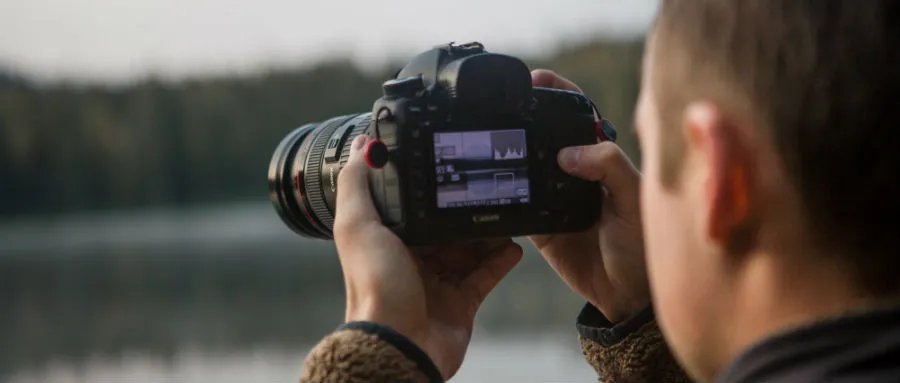
Let's say you're really getting into photography and getting to know more and more about your camera and its settings. But what's that graph on the screen of your camera when you've captured a photo? That's the histogram and we're going to explain what it shows and how you can use it to your advantage below. After reading this page, you'll know even more about what's possible with your camera!

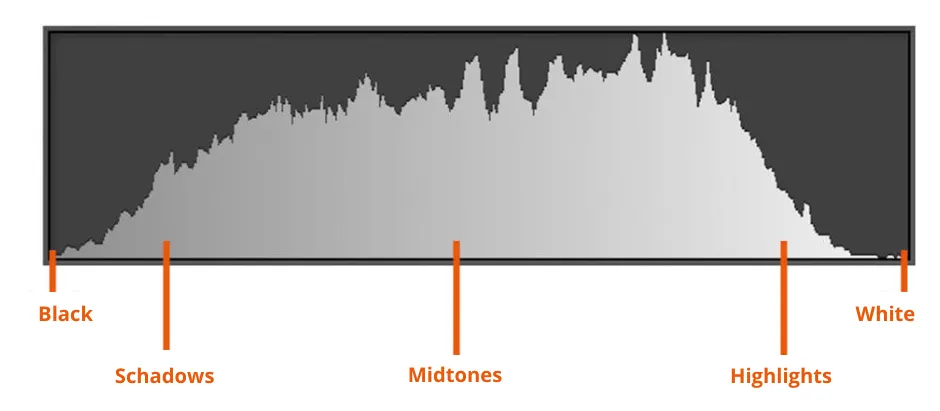
The histogram is found on the screen of your camera and looks like a kind of graph. On this graph, you can see if a captured photo is properly exposed. The histogram shows how strong the light intensity of the photo is, with dark tones, light tones and all tones in between. On the left-hand side of the histogram, you'll find the dark tones and the light tones on the far right. When you see high peaks in your histogram, it means that there is more information for that tone in the image. A histogram doesn't literally represent the colours but rather the brightness of each colour. For example, dark blue takes on a darker hue and will be displayed more on the left. And light blue will be rendered on the right side because it is a light shade.
Histogram photo.png

How do you read a histogram?

Like a book, a histogram is read from left to right. The horizontal line indicates the brightness from dark tones (black) to light tones (white). In between are many different shades of grey. The vertical axis of the histogram indicates the amount of pixels of brightness. There are no particular numbers attached to this and therefore it is a relative quantity. The higher the peak in the graph is, the more pixels of that brightness can be found in your photo.

A generally well-exposed photograph has a histogram that resembles a mountain. That is, a nice curve with the top in the middle of the histogram. But there are always exceptions to the rule! Because obviously you're not always shooting in the same kind of setting. In fact, your histogram will often vary due to the environment you are in and the camera settings you use. You can also read about this below in the section on photos with lots of black or white. The bottom line is that the "perfect" histogram does not exist. However, it is important that the peaks don't drop straight down suddenly or that there are too many pixels at the edges of the histogram. That's because this means that details of your shot will be lost in the shadows or highlights.

Camera_met_histogram4.jpg

How do you recognise over- and under-exposure?

A histogram is very useful if you're in doubt about whether your photo is sufficiently exposed. It can immediately show you if you're shooting in too dark or too light conditions.

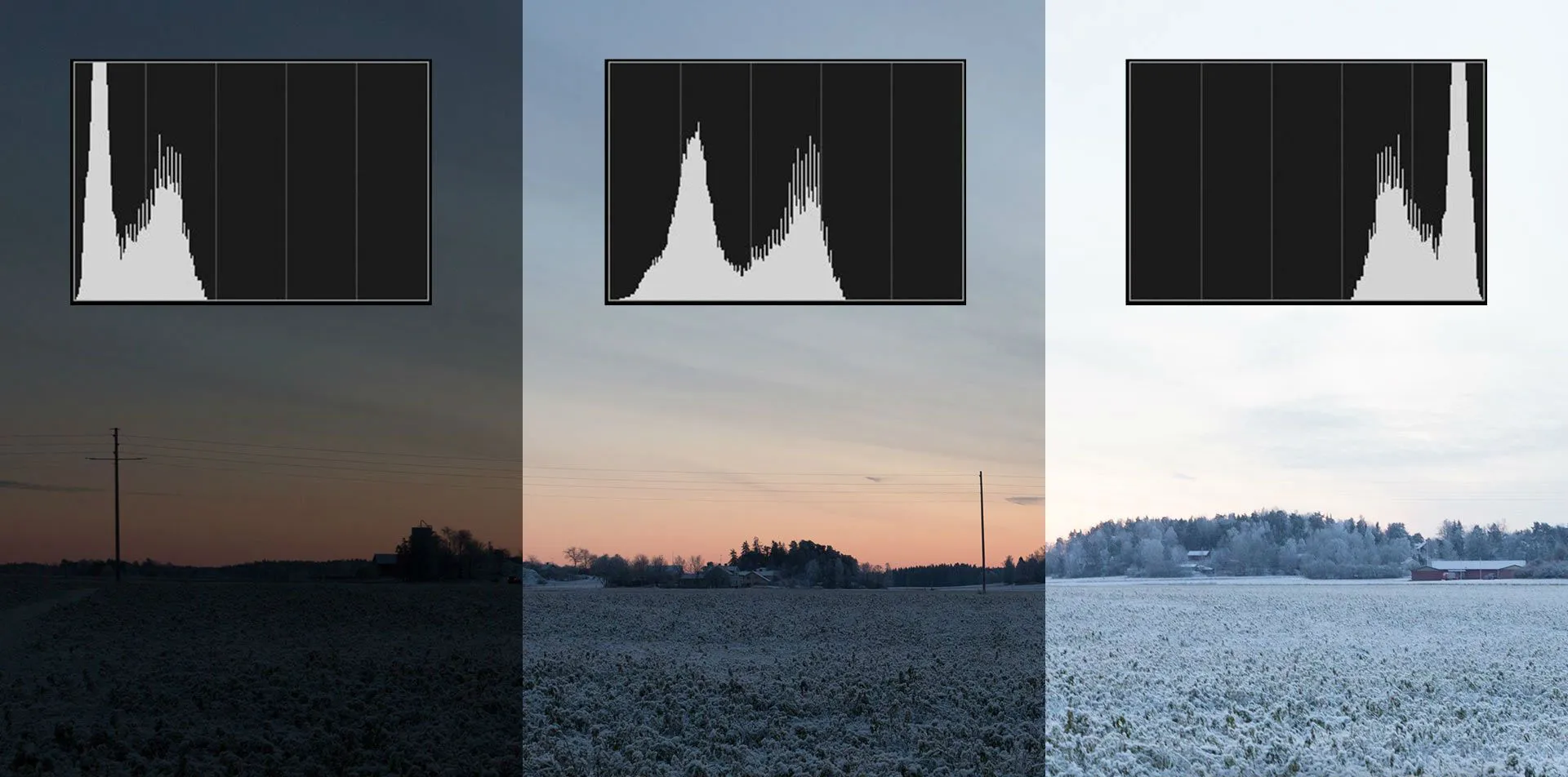
In a photo that is overexposed, you'll see nothing at all or almost no peak on the left side of the histogram. On the contrary, the right side of the histogram will show a high peak. You can tell from this that there is too much light/white and not enough shadow/black showing in the photo you took.

An underexposed photo will actually display an inverted histogram compared to the one decribed above. You'll now see a high peak on the left side of the histogram and hardly any peak on the right. So this means that there is too much shadow/black and too little light/white in the photo.

onder_vs_overbelicht.jpg

Photos with a lot of black or white

There are also cases when your histogram should just have a peak on the left or right side.

If you take a picture of a subject with a lot of white in it, your histogram will indicate that the picture is too light with a peak on the right side. But you want this photo to have this lighting because otherwise, the white colours won't show up well. So this means that you still have your photo exposed just fine despite the fact that the histogram shows a large peak on the right side.

Conversely, this is also true for a dark photo, for example, when you take a portrait photo with a black background. The histogram will then show a high peak on the left side since your camera thinks it's very dark. But you obviously want a photo with a black background to be dark since there will be a lot of black in the photo. So in this situation, the photo is well exposed even though you have a peak on the left.

Foto_veel_wit2.jpg
This photo will in the histogram say overexposed
foto_met_veel_zwart4.jpg
This photo will be underexposed in the histogram

So it's important not to blindly rely on the histogram to determine whether a photo is properly exposed. As you read above, it also very much depends on where and when you want to take your picture. The histogram is a very useful tool to see if a photo is too light or too dark but ultimately you have to be very mindful of the conditions which make up your perfect picture.