• Photo cameras
  • Lenses
  • Tripod
  • Video Cameras
  • Bags
  • Studio
  • Image editing
  • Binoculars
  • Accessories
  • Promotions
  • Canon
  • Sony
  • Nikon
  • Panasonic
  • Fujifilm
  • Sigma
  • DJI
  • Tamron
  • OM SYSTEM
  • Epson
  • All brands
  • Popular Sony Cameras
  • sony-a7v-1.jpg

    Sony A7 V

  • sony-a6700-body_1.jpg

    Sony A6700 body

  • 12311310_1.jpg

    Sony Cybershot DSC-RX100 mark VII

  • Popular Sony Lenses
  • SONY-FE-24-70MM-F2.8-GM-II-1.jpg

    Sony FE 24-70mm F/2.8 GM II

  • SONY-FE-24-105MM-F4.0G-OSS-1.jpg

    Sony FE 24-105mm F4 G OSS E-Mount

  • SONY-FE-50MM-F1.8-1.jpg

    Sony 50mm F1.8 E-Mount Full Frame

  • Popular Nikon Cameras
  • Nikon-Z8_1.jpg

    Nikon Z8 body

  • nikon-z6-iii-1.jpg

    Nikon Z6 III

  • nikon-zf_1.jpg

    Nikon ZF

  • Popular Nikon Lenses
  • Nikon Z 24-70mm F28 S-line Nikkor 1.jpg

    Nikkor Z 24-70mm F2.8 S

  • Nikon-Z-70-200mm-F18-S-line-Nikkor-1.jpg

    Nikon Z 70-200mm F/2.8 S-line Nikkor

  • Nikon-Z-135mm-F1.8-1.jpg

    Nikon Z 135mm F/1.8 S-line Plena

  • Popular Panasonic Cameras
  • panasonic-g9ii-1.jpg

    Panasonic LUMIX DC-G9II

  • panasonic_lumix_S52X-1.jpg

    Panasonic Lumix DC-S5IIX Body

  • panasonic_lumix_s5_m2_body.jpg

    Panasonic Lumix DC-S5II body

  • Popular Panasonic Lenses
  • 12289260_1.jpg

    Panasonic 24-105mm F4.0 L-Mount

  • panasonic-lumixs-50mm-f18_1.jpg

    Panasonic Lumix S 50 mm F/1.8

  • 12217412_1.jpg

    Panasonic Lumix G Vario 100-300mm F4-5.6 II O.I.S.

  • Popular Fujifilm Cameras
  • fujifilm_x-t5_zwart-1.jpg

    Fujifilm X-T5 Body Black

  • Fujifilm-X-E5-zwart-1.jpg

    Fujifilm X-E5 black

  • fujifilm-x100vi-silver-1.jpg

    Fujifilm X100VI silver

  • Popular Fujifilm Lenses
  • Fujifilm_30700_foto1.jpg

    Fujifilm XF 70-300mm F/4.0-5.6 R LM OIS WR

  • 11024042_32426.jpg

    Fujinon XF 16-55mm f/2.8 R LM WR

  • Fujifilm_XF33mm_F14_RWR_foto1.jpg

    Fujifilm XF 33mm F/1.4 R WR

  • Popular Sigma wide angle lenses
  • sigma-24-70-f2.8-dgdnii-art-lens-1.jpg

    SIGMA 24-70mm F2.8 DG DN II Art Sony E-mount

  • Sigma-18-50-E_1.jpg

    Sigma 18-50mm F/2.8 DC DN Contemporary Sony E

  • Popular Sigma macro lenses
  • Sigma_105mm_F2.8_1_2.jpg

    Sigma 105mm F/2.8 DG DN Macro ART Sony FE

  • Popular Sigma telephoto lenses
  • 12201072_1.jpg

    Sigma 150-600mm F/5-6.3 DG OS HSM Contemporary Canon EF

  • Sigma_70_200_2.8_1.jpg

    Sigma 70-200mm F/2.8 DG DN OS Sports Sony FE-mount

  • Popular DJI Drones
  • DJI-Mini-5-Pro-Fly-More-Combo-Smart-Controller-Cleaning-Kit_1.1.jpg

    DJI Mini 5 Pro Fly More Combo + Smart Controller & Cleaning Kit

  • 12508293_1.jpg

    DJI Air 3S Fly More Combo + RC 2 Remote Controller

  • Popular DJI action cameras
  • dji-osmo-action-6-adventure-combo-1.webp

    DJI Osmo Action 6 - Adventure Combo

  • osmo pocket4-in the box 2.jpg

    DJI Osmo Pocket 4 Creator Combo

  • Popular DJI Stabilisers
  • dji-rs-5-combo_12.jpg

    DJI RS 5 Combo

  • DJI-RS-4-Mini-1.jpg

    DJI RS 4 Mini Combo

  • Popular Tamron wide angle lenses
  • 12308793_1.jpg

    Tamron 17-28mm F/2.8 Di III RXD Sony FE

  • Tamron-28-75mm-F2.8-Di-III-VXD-G2_2.jpg

    Tamron 28-75mm F/2.8 Di III VXD G2 Sony FE

  • Popular Tamron macro lenses
  • Tamron-20mm-F28-Di-III-OSD.jpg

    Tamron 20mm F/2.8 Di III OSD Sony FE

  • Popular Tamron telephoto lenses
  • Tamron 28-200mm F2.8-5.6 Di III RXD_1.jpg

    Tamron 28-200mm F/2.8-5.6 Di III RXD Sony FE

  • 12425774-1.jpg

    Tamron 50-400mm F/4.5-6.3 Di III VC VXD Sony FE

  • Popular Olympus Cameras
  • 12481096_1.jpg

    OM SYSTEM OM-1 mark II body

  • OMSystem_Tough_TG7_rood_foto1.jpg

    OM SYSTEM Tough TG-7 - Red

  • Olympus-E-M10-IV-zilver_1.jpg

    Olympus OM-D E-M10 Mark IV Silver

  • Popular Olympus Lenses
  • om-system-mzuiko-12-40mm_1.jpg

    OM SYSTEM MFT 12-40 mm F/2.8 PRO II

  • 11011001_24500.jpg

    Olympus M.Zuiko Digital ED 60mm F2.8 Macro Black

  • Olympus_MFT_14-150mm_f40-56II_zwartED_M.JPG

    Olympus M.Zuiko Digital 14-150mm F4.0-5.6 II Black

  • Popular Epson printers
  • Epson-EcoTank-ET-8550_1.jpg

    Epson EcoTank ET-8550 All-in-one A3+ Photo Printer

  • 12364673_1.jpg

    Epson EcoTank ET-8500 All-in-one Photo Printer

  • 12333395.jpg

    Epson SureColor SC-P700 A3+ Photo Printer

  • Popular Epson scanners
  • 12171706_1.jpg

    Epson Perfection V600 Photo

  • 12203118.jpg

    Epson Perfection V850 Pro

  • 12447712_1.jpg

    Epson Perfection V39II Scanner

  • Nature photography
  • City photography
  • Model photography
  • Action photography
  • Reportage photography
  • Studio photography
  • Videography
  • Techniques

Polaroid Now+ Generation 2

####This is how you get the most out of your Polaroid camera.

In a world brimming with digital photography, it's important to dwell on the moments that otherwise pass by so quickly. The Polaroid Now+ helps you to consciously reflect upon, and capture, these moments. The nostalgic feeling you get when operating the camera, the design that evokes the 1970s and the photo being developed before your eyes all round off the experience.

But how do you go about using the 2nd generation Polaroid Now+ cameras? That's where we come in, with this blog.

What types of film to use?

To take photos with the Polaroid Now+, you need film on which to print the photo. This camera is compatible with two types of film: Polaroid i-Type and Polaroid 600. The Polaroid 600 film features a small battery and is really only meant for use with older Polaroid models. For Polaroid Now+, and its built-in Lithium-ion battery, it's better to use Polaroid i-Type film.

A popular theory is the need to shake the film after it is printed, but thanks to present-day technology, you no longer have to do that. In actual fact, shaking the film can cause spots in your photo during development. The best way is to set a new photo aside for at least 15 minutes: out of the sun and photo side down.

View the i-Type film here

polaroid-blog-2.jpg

Operating the Polaroid Now+

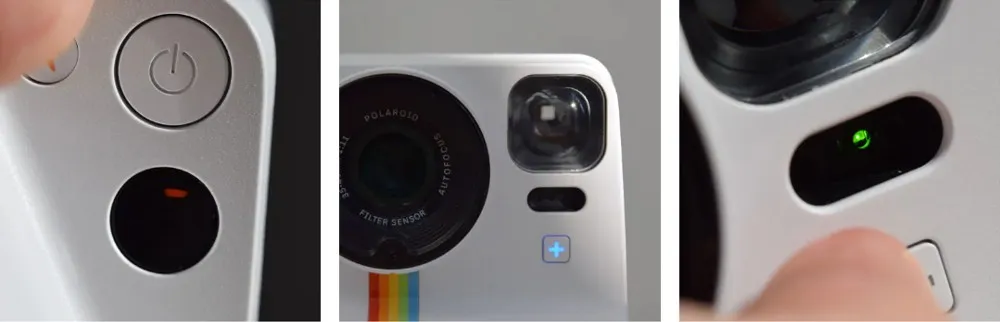
The Polaroid Now+ features two buttons that enable you to use various functions and basic settings. The button on the front of the camera provides access to three functions:

  • Press once for the 10-second self-timer (orange light)
  • Press twice for 'Double Exposure' (green light)
  • Press and hold for the shortcut to the self-set function (red light)

The button on the back of the camera provides access to two functions:

  • Press once to switch the flash on or off
  • Press and hold to activate exposure compensation.
polaroid-blog-3.jpg

Polaroid App

The Polaroid camera is easy to operate on its own, but the Polaroid App makes it even easier. Plus, this app also gives you access to additional features such as Lightpainting, manual focus, Aperture, Tripod and Portrait.

The Polaroid App is very user-friendly, and explains all its functions upon first-time use. Do pay attention when you are in the App though. You see, it's easy to press the red record button by mistake, which will mean your camera immediately taking a picture. And you don't want that, of course!

Using Bluetooth, it is easy to connect your Polaroid Now+ to your Smartphone. The + button on the camera lights up blue when the connection is successful.

When to use the flash?

As you may know, exposure is key in analog photography. With the Polaroid Now+, use of the flash is almost always a must. More important to know though is when NOT to use the flash!

  • The Polaroid Now+'s flash has a maximum range of two metres. If your subject is farther away than two metres, it's better to turn the flash off. This is because, in terms of exposure, the camera's software no longer takes into account subjects outside this range, leaving you with a really dark photo when using the flash.
  • It's also better to turn off the flash on sunny days. Sunlight is more than enough to make a good photo. In this case, make sure you shoot with the sun behind you.

Using lens filters?

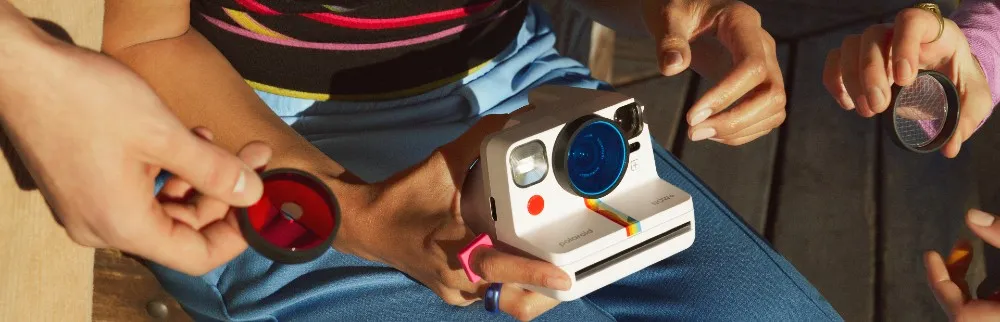
Several lens filters are supplied with the Polaroid Now+. Using these coloured filters, you can let your creativity run wild. The filters are very easy to fit, allowing you to quickly switch between them for maximum convenience.

polaroid-blog-4.jpg

Changing the cartridge

The cartridge runs out after 8 shots, which is when you need to change it. To do this, first switch the camera off. Next, press the button on the side of the camera, which opens the cartridge compartment cover. You now have to use quite a bit of force to remove the empty cartridge from the camera.

Then, insert a new cartridge. Make sure the paper sits with the drawing facing up. This paper comes out automatically after inserting the cartridge, after which you can carry on capturing cherished moments.