




Mobile Pixels Duex Float







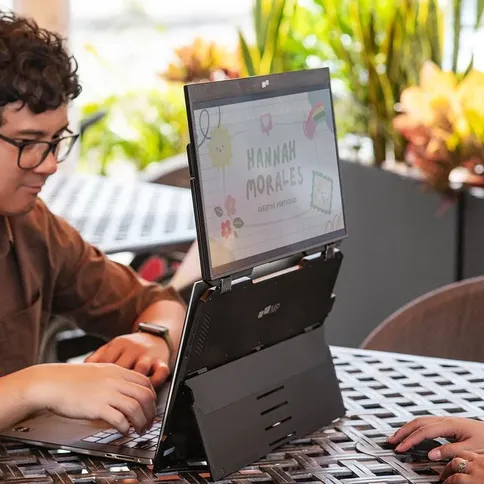

The Mobile Pixels Duex Float is a convenient yet affordable stackable portable monitor that lets you work on multiple screens on the go.
List price 269,99 €
239, 96 €
Feel free to contact us for alternatives
The Mobile Pixels Duex Float is a convenient yet affordable stackable portable monitor that lets you work on multiple screens on the go.
Reviews
Description
Mobile Pixels Duex Float
The Mobile Pixels Duex Float is a convenient yet affordable stacked portable monitor that lets you work on multiple screens on the go. Plus, increase productivity and achieve ergonomic alignment with its stacked design.
The Duex Float takes your work and play to the next level with its intuitive 1080p touchscreen. You can also customize the colour of your screen to protect your eyes during extra-long workdays or late-night projects.
Tired of straining your neck and back while working on the go? Meet the latest innovation: the Duex Float, a 15.6-inch 1080p touchscreen portable laptop monitor that lets you easily create a dual-screen stacked setup wherever you are. If you're someone who needs to multitask without covering your desk with extra screens, Duex Float is the answer.
The dual-hinge system gives you the flexibility to choose from three modes: dual-screen mode, presentation mode, and desktop mode. You can choose your mode for optimal productivity.
Dual-screen mode
Use it as your secondary monitor, as an extended display, or as a mirrored display. Achieve a healthy ergonomic posture while working on the go.
Presentation mode
You can also flip the screen around and easily share content with someone in front of you.
Desktop mode
Turn Duex Float into a standalone display. Perfect for gaming or viewing documents.
Duex Float is compatible with Apple Stage Manager for iPad OS. Instead of mirroring content in a 4:3 display, the iPad* shows active apps in a large 15.6-inch 16:9 space. (*External display support is reserved for iPads using M-series processors.)
With USB-C connectivity, Duex Float gives you extra screen space for your Android* phone. Provides a more comfortable view of all your content. (*For devices supporting Samsung DeX)
Duex Float has a convenient built-in stand, so you can use it on its own without having to magnetically attach it to your laptop. The built-in stand also allows you to attach it to any size laptop. Four magnets are included if you prefer to magnetically attach the Duex Float to your laptop.
Features of the Mobile Pixels Duex Float:
- 15.6-inch 1080p touchscreen
- Perfect for 15- to 16-inch laptops
- Stacked design
- Two USB-C ports with pass-through charging
- One mini HDMI port connectivity
- Built-in kickstand
- Three different viewing modes
- Resolution: 1920 x 1080 pixels
- Refresh rate: 60 Hz
- Brightness: 250 cd/m2 (adjustable)
- Touchscreen: 10-point multitouch
- Compatibility: Windows, MacOS, Linux, ChromeOS, Switch, XBox, Playstation (*Touch works on both Windows and Mac)
- Connections: 2x USB-C / 1x Mini HDMI port
- Power consumption: 7W total
- Dimensions: 36.1 x 23.1 x 2 cm
- Weight: 1.8 kg
- (Delivered without laptop)
In the Box:
- 1x Mobile Pixels Duex Float monitor
- 1x USB-C cable with USB-A adapter
- 1x Mini HDMI to HDMI cable
- 4x Laptop Magnet
- 1x User Manual
Mobile Pixels Duex Float
The Mobile Pixels Duex Float is a convenient yet affordable stacked portable monitor that lets you work on multiple screens on the go. Plus, increase productivity and achieve ergonomic alignment with its stacked design.
The Duex Float takes your work and play to the next level with its intuitive 1080p touchscreen. You can also customize the colour of your screen to protect your eyes during extra-long workdays or late-night projects.
Tired of straining your neck and back while working on the go? Meet the latest innovation: the Duex Float, a 15.6-inch 1080p touchscreen portable laptop monitor that lets you easily create a dual-screen stacked setup wherever you are. If you're someone who needs to multitask without covering your desk with extra screens, Duex Float is the answer.
The dual-hinge system gives you the flexibility to choose from three modes: dual-screen mode, presentation mode, and desktop mode. You can choose your mode for optimal productivity.
Dual-screen mode
Use it as your secondary monitor, as an extended display, or as a mirrored display. Achieve a healthy ergonomic posture while working on the go.
Presentation mode
You can also flip the screen around and easily share content with someone in front of you.
Desktop mode
Turn Duex Float into a standalone display. Perfect for gaming or viewing documents.
Duex Float is compatible with Apple Stage Manager for iPad OS. Instead of mirroring content in a 4:3 display, the iPad* shows active apps in a large 15.6-inch 16:9 space. (*External display support is reserved for iPads using M-series processors.)
With USB-C connectivity, Duex Float gives you extra screen space for your Android* phone. Provides a more comfortable view of all your content. (*For devices supporting Samsung DeX)
Duex Float has a convenient built-in stand, so you can use it on its own without having to magnetically attach it to your laptop. The built-in stand also allows you to attach it to any size laptop. Four magnets are included if you prefer to magnetically attach the Duex Float to your laptop.
Features of the Mobile Pixels Duex Float:
- 15.6-inch 1080p touchscreen
- Perfect for 15- to 16-inch laptops
- Stacked design
- Two USB-C ports with pass-through charging
- One mini HDMI port connectivity
- Built-in kickstand
- Three different viewing modes
- Resolution: 1920 x 1080 pixels
- Refresh rate: 60 Hz
- Brightness: 250 cd/m2 (adjustable)
- Touchscreen: 10-point multitouch
- Compatibility: Windows, MacOS, Linux, ChromeOS, Switch, XBox, Playstation (*Touch works on both Windows and Mac)
- Connections: 2x USB-C / 1x Mini HDMI port
- Power consumption: 7W total
- Dimensions: 36.1 x 23.1 x 2 cm
- Weight: 1.8 kg
- (Delivered without laptop)
In the Box:
- 1x Mobile Pixels Duex Float monitor
- 1x USB-C cable with USB-A adapter
- 1x Mini HDMI to HDMI cable
- 4x Laptop Magnet
- 1x User Manual
Specifications
| Display | |
|---|---|
| Touchscreen | |
| Shape (Flat/Curved) |
| Display & Image Quality | |
|---|---|
| Screen diagonal (inch) | 15.6 |
| General | |
|---|---|
| Article number | 12491131 |
| Product colour | |
| Built-in speakers |
| Image quality | |
|---|---|
| Brightness (cd/m2) | 250 |
| Refresh rate (Hz) | 60 Hz |
| Maximum image resolution | 1920x1080 |
| Physical properties | |
|---|---|
| Weight (in grams) | 1,800.00 |
| Technical specs | |
|---|---|
| Power consumption (W) | 7.00 |
| Display | |
|---|---|
| Touchscreen | |
| Shape (Flat/Curved) |
| Image quality | |
|---|---|
| Brightness (cd/m2) | 250 |
| Refresh rate (Hz) | 60 Hz |
| Maximum image resolution | 1920x1080 |
| Technical specs | |
|---|---|
| Power consumption (W) | 7.00 |
| Display & Image Quality | |
|---|---|
| Screen diagonal (inch) | 15.6 |
| General | |
|---|---|
| Article number | 12491131 |
| Product colour | |
| Built-in speakers |
| Physical properties | |
|---|---|
| Weight (in grams) | 1,800.00 |