


Fujitsu ScanSnap IX1500
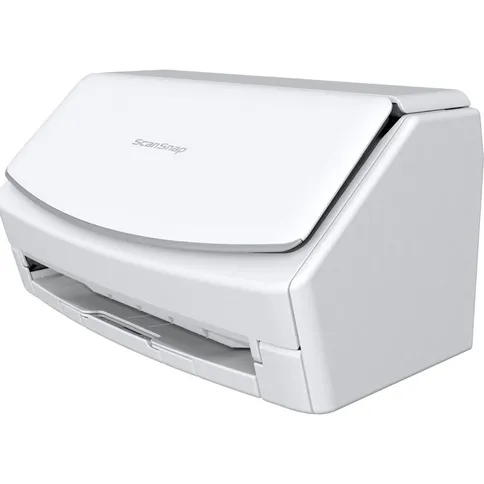


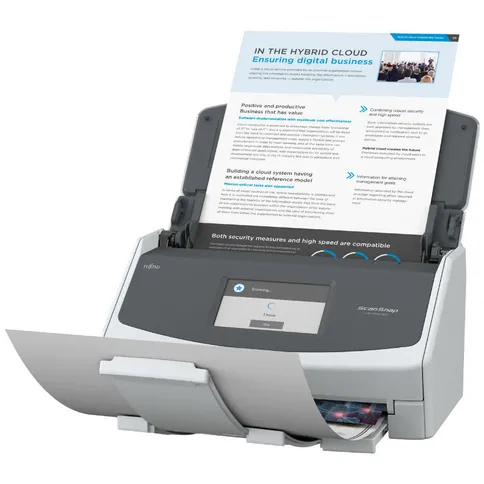

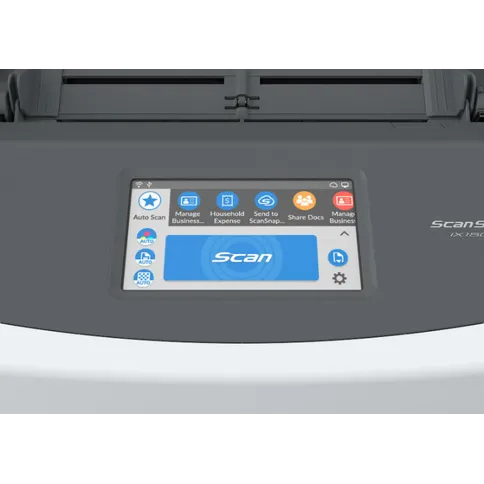

The Fujitsu ScanSnap IX1500 takes efficiency to a new level. The scanner offers even more intuitive use through simple operation. You can complete processes from scanning to data usage with just a single touch of the 4.3-inch touchscreen.
List price 549 €
430, 95 €
Feel free to contact us for alternatives
The Fujitsu ScanSnap IX1500 takes efficiency to a new level. The scanner offers even more intuitive use through simple operation. You can complete processes from scanning to data usage with just a single touch of the 4.3-inch touchscreen.
Reviews
Description
Fujitsu ScanSnap IX1500
The Fujitsu ScanSnap IX1500 takes efficiency to a new level. The scanner offers even more intuitive use through the simple operation. You can complete processes from scanning to data usage with just one touch of the 4.3-inch touchscreen. Basic tasks such as the setup and WiFi configuration, checking the scan status and choosing locations to store files are easy, even for starters. Share your ScanSnap so everyone can use it. A scanner can be shared with business colleagues and family members with software licenses for multiple accounts. The IX1500 is designed for ultimate convenience and adds more productivity to your lifestyle. Thanks to the adjustable and aesthetic design of the scanner, you can keep anywhere, so that it stays where the scanner is most used, your office, living room or study. Scan single and double-sided documents with the ease of a speed of 30 sheets per minute. When you choose "Quick" startup, you can start scanning even faster. Scan documents larger than A4 size, envelopes and much more with the manual scan mode. Documents that are usually difficult to scan in the normal scanning mode can now be captures without problems. Scan small documents effortlessly. You do not have to worry about entering receipts and business cards that tend to curl or get crooked. Receive notifications on the touchscreen when dust is detected that can result in a striped image. Pre-service maintenance allows you to reduce the hassle with time-consuming rescanning. Even if streaks appear on scanned images, the Streak Reduction feature removes them to produce pure images. Connect the iX1500 to your computer or smart device in the office and at home, using existing WiFi environments. A connection is also possible in environments without WiFi using the Direct Connect mode, because the scanner itself acts as an access point. Supports 2.4 GHz WiFi and ensures a smooth data transfer. Features of the Fujitsu ScanSnap IX1500 Touchscreen for different activities Perfect adaptability for both personal and shared use Sophisticated design Fast color scanning at 30 ppm Automatic document feeder (ADF) of 50 sheets Uniform recording of each document with a manual for scanning and receiving Detection of dust and removal of stripes for pure images Wireless connection with PC, Mac, iOS or Android mobile devices Better experiences with ScanSnap Home Included with the Fujitsu ScanSnap IX1500 Fujitsu ScanSnap IX1500 Power cable USB cable User manual
Fujitsu ScanSnap IX1500
The Fujitsu ScanSnap IX1500 takes efficiency to a new level. The scanner offers even more intuitive use through the simple operation. You can complete processes from scanning to data usage with just one touch of the 4.3-inch touchscreen. Basic tasks such as the setup and WiFi configuration, checking the scan status and choosing locations to store files are easy, even for starters. Share your ScanSnap so everyone can use it. A scanner can be shared with business colleagues and family members with software licenses for multiple accounts. The IX1500 is designed for ultimate convenience and adds more productivity to your lifestyle. Thanks to the adjustable and aesthetic design of the scanner, you can keep anywhere, so that it stays where the scanner is most used, your office, living room or study. Scan single and double-sided documents with the ease of a speed of 30 sheets per minute. When you choose "Quick" startup, you can start scanning even faster. Scan documents larger than A4 size, envelopes and much more with the manual scan mode. Documents that are usually difficult to scan in the normal scanning mode can now be captures without problems. Scan small documents effortlessly. You do not have to worry about entering receipts and business cards that tend to curl or get crooked. Receive notifications on the touchscreen when dust is detected that can result in a striped image. Pre-service maintenance allows you to reduce the hassle with time-consuming rescanning. Even if streaks appear on scanned images, the Streak Reduction feature removes them to produce pure images. Connect the iX1500 to your computer or smart device in the office and at home, using existing WiFi environments. A connection is also possible in environments without WiFi using the Direct Connect mode, because the scanner itself acts as an access point. Supports 2.4 GHz WiFi and ensures a smooth data transfer. Features of the Fujitsu ScanSnap IX1500 Touchscreen for different activities Perfect adaptability for both personal and shared use Sophisticated design Fast color scanning at 30 ppm Automatic document feeder (ADF) of 50 sheets Uniform recording of each document with a manual for scanning and receiving Detection of dust and removal of stripes for pure images Wireless connection with PC, Mac, iOS or Android mobile devices Better experiences with ScanSnap Home Included with the Fujitsu ScanSnap IX1500 Fujitsu ScanSnap IX1500 Power cable USB cable User manual
Specifications
| Info | |
|---|---|
| Article number | 12280578 |
| Overig | |
|---|---|
| Power plug |
| Info | |
|---|---|
| Article number | 12280578 |
| Overig | |
|---|---|
| Power plug |