




B.I.G Lens Adapter Olympus OM to Canon RF
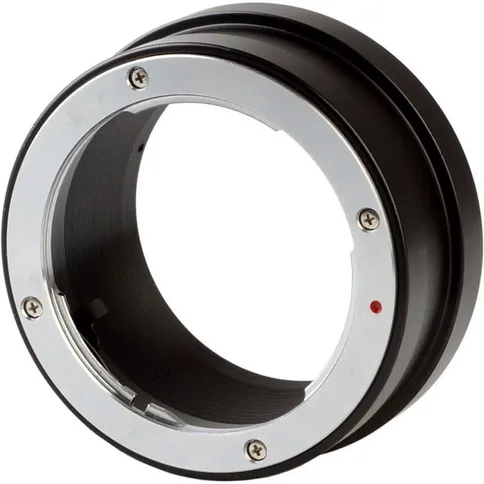

With the B.I.G lens adapter Olympus OM to Canon RF you can combine your Olympus OM lenses with the camera body of the Canon RF
49, 99 €
This product is purchased exclusively for you.
With the B.I.G lens adapter Olympus OM to Canon RF you can combine your Olympus OM lenses with the camera body of the Canon RF
Reviews
Description
B.I.G lens adapter Olympus OM to Canon RF
Have you chosen the Canon RF mirrorless system, but still want to use your existing lenses? This is possible. With the B.I.G lens adapter Olympus OM to Canon RF you can combine your Olympus OM lenses with the camera body of the Canon RF. It should be noted with this combination that there is no carry over from the autofocus control or the aperture control. The subject must therefore be focused manually. Exposure control is with working aperture metering (that is, the aperture currently set on the lens) in User manual setting "M" or with the automatic aperture setting. That means you normally choose the shutter speed all by yourself ("M") or use the camera's automatic aperture setting to set the aperture manually.
Features of the B.I.G Lens Adapter Olympus OM to Canon RF
- Use this Olympus OM lenses on the Canon RF body
- No autofocus control or aperture control transmission
- User manual focus
- Lens connection: Olympus OM
- Camera connection: Canon RF
In the Box
- B.I.G lens adapter Olympus OM to Canon RF
Information on the EU General Product Safety Regulation (GPSR)
B.I.G.
B.I.G. photo equipment
Mooslohstr. 60 92637 Weiden DE
B.I.G lens adapter Olympus OM to Canon RF
Have you chosen the Canon RF mirrorless system, but still want to use your existing lenses? This is possible. With the B.I.G lens adapter Olympus OM to Canon RF you can combine your Olympus OM lenses with the camera body of the Canon RF. It should be noted with this combination that there is no carry over from the autofocus control or the aperture control. The subject must therefore be focused manually. Exposure control is with working aperture metering (that is, the aperture currently set on the lens) in User manual setting "M" or with the automatic aperture setting. That means you normally choose the shutter speed all by yourself ("M") or use the camera's automatic aperture setting to set the aperture manually.
Features of the B.I.G Lens Adapter Olympus OM to Canon RF
- Use this Olympus OM lenses on the Canon RF body
- No autofocus control or aperture control transmission
- User manual focus
- Lens connection: Olympus OM
- Camera connection: Canon RF
In the Box
- B.I.G lens adapter Olympus OM to Canon RF
Information on the EU General Product Safety Regulation (GPSR)
B.I.G.
B.I.G. photo equipment
Mooslohstr. 60 92637 Weiden DE
Specifications
| General | |
|---|---|
| Article number | 12389442 |
| Body mount | Canon RF |
| Technical specs | |
|---|---|
| Lensmount | Olympus OM |
| General | |
|---|---|
| Article number | 12389442 |
| Body mount | Canon RF |
| Technical specs | |
|---|---|
| Lensmount | Olympus OM |